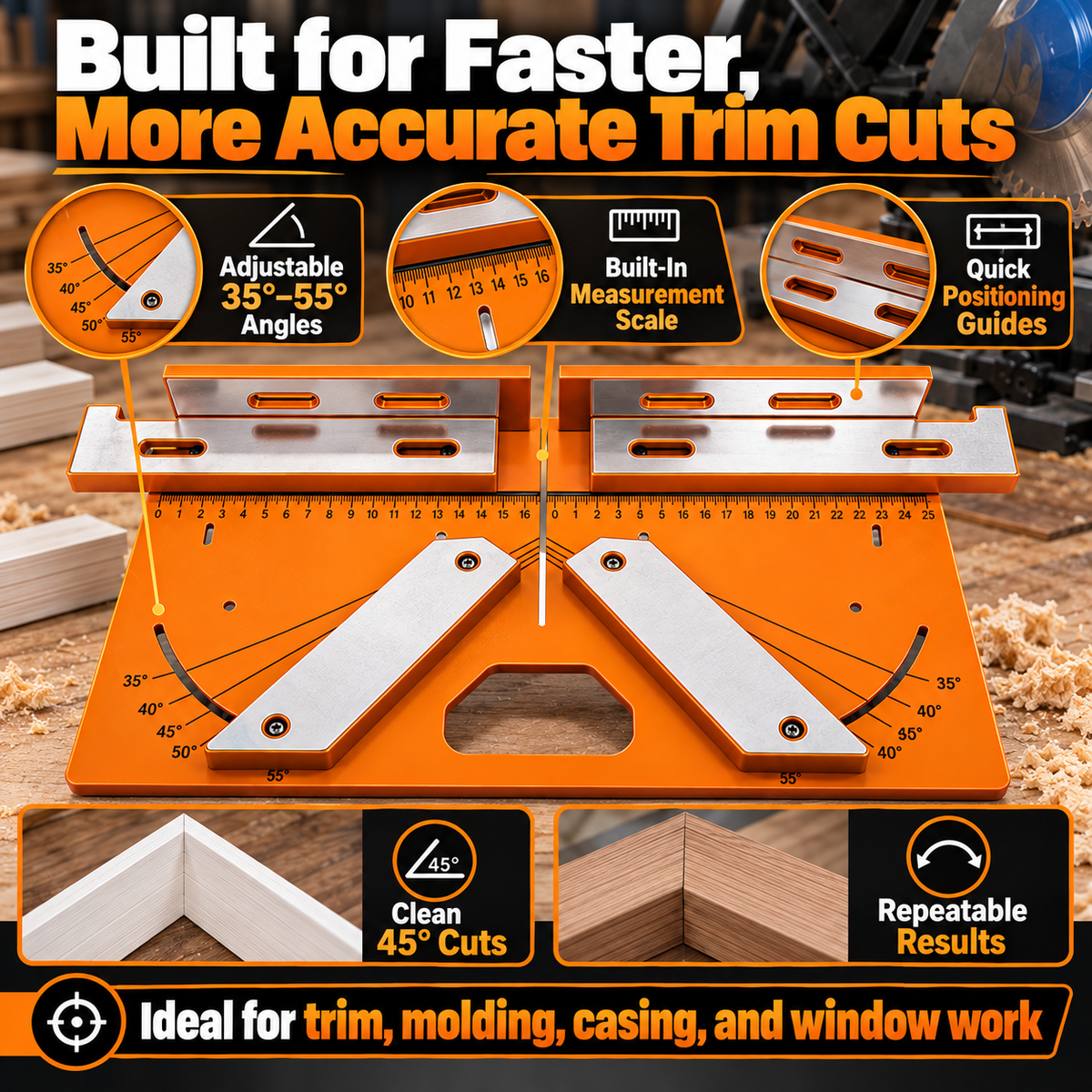
🛠️ Precision Miter Trim Cutting Jig | Adjustable 35°–55° Angles, Built-In Measuring Scale & Faster, Cleaner Trim Cuts 📐
🛠️ Precision Miter Trim Cutting Jig | Adjustable 35°–55° Angles, Built-In Measuring Scale & Faster, Cleaner Trim Cuts 📐
Free Shipping $49.99+
Couldn't load pickup availability
-
Ordered
- - -
Order Ready
- - -
Delivered
Crooked Angles. Visible Gaps. Wasted Trim Pieces.
Cutting trim should not mean measuring the same piece over and over, second-guessing every angle or discovering a gap after the pieces are already installed.
When working on door casings, baseboards and window trim, small alignment errors can make a finished corner look uneven and lead to unnecessary rework.

Angles That Are Hard to Repeat
Small changes in positioning can make it harder to reproduce the same cut across multiple pieces.
Gaps at Finished Corners
Poorly aligned trim ends can leave visible gaps that distract from an otherwise finished room.
Extra Measuring and Rework
Repeated setup and discarded offcuts can slow down a trim installation project.
Position with Confidence. Cut with More Consistency.
Meet the Precision Miter Trim Cutting Jig — a practical positioning aid designed to help organize your trim-cutting setup and make repeat cuts easier to manage.
With adjustable angle guides, a built-in measurement scale and clearly marked positioning references, it helps bring more structure to everyday trim and molding work.

Adjustable 35°–55° Guides for Flexible Trim Positioning.
Different trim profiles and installation layouts can call for different cutting angles. The adjustable guides help you set up the trim at a chosen angle within the marked range.
Use the angle markings as a visual reference when preparing pieces for corners and other trim applications.

Visible Angle Markings
Reference the marked angles while setting up the trim for the cut you need.
Adjustable Guide Position
Position the guides to suit the intended setup instead of relying on guesswork alone.
More Repeatable Setups
Reuse your established positioning when preparing multiple matching trim pieces.
Less Guesswork. Clearer Positioning.
Switching between a separate ruler, angle reference and cutting setup can interrupt the flow of a project.
The integrated measurement scale and visible guide markings give you useful reference points directly on the jig while you position the trim.

Built-In Measuring Scale
Read the visible scale while positioning your trim for the next cut.
Clear Positioning References
Use the guide slots and angle markings to organize your setup more consistently.
A More Organized Workflow
Keep key positioning references close at hand while preparing trim for the saw.
Mount. Align. Cut. A Clearer Workflow.
The jig is designed to help organize trim positioning before the cut. Follow the appropriate setup procedure for your saw and workpiece.

Set Up the Jig
Position and secure the jig according to its instructions and the requirements of your miter saw setup.
Align the Trim
Use the measurement scale, guide slots and angle markings to position the trim for your intended cut.
Check and Make the Cut
Verify the angle, workpiece position and saw setup before cutting. Follow the saw manufacturer's safety instructions.
Repeat for Matching Pieces
Reuse the established setup when preparing additional pieces for the same project.
A Practical Helper for Your Miter Saw Workflow.
The product imagery shows the jig positioned with a miter saw for trim, molding and casing cuts. Its purpose is to help organize workpiece positioning during setup.
Whether you're preparing door casing or working on window trim, a consistent setup can make repeated cuts easier to manage.

Door Casings
Organize trim positioning for door-frame finishing work.
Window Trim
Use the guide references when preparing window casing and decorative trim.
Baseboards and Molding
Support a more organized approach to matching trim pieces around interior corners.
Cleaner Corners. Less Rework. More Usable Trim.
The difference between a neat corner and a frustrating one often comes down to how accurately the pieces are measured, positioned and cut.
By helping establish a repeatable positioning setup, the jig is designed to support cleaner miter fits and reduce avoidable trim waste caused by setup errors.

Better-Aligned Miter Joints
Use consistent positioning to help prepare trim pieces for cleaner corner joints.
Less Avoidable Material Waste
A more deliberate setup can help reduce mistakes that require replacement cuts.
A More Polished Result
Carefully aligned trim helps create a cleaner-looking finished installation.
Keep Your Setup Consistent Across Multiple Pieces.
Longer trim projects often require several pieces prepared at matching angles. Rebuilding the setup from scratch for every piece can slow you down.
The adjustable guides, built-in scale and positioning references are designed to help you maintain a more consistent workflow as you work through a project.

Repeat Your Positioning
Reuse a checked setup when preparing multiple pieces for the same job.
Reduce Repeated Setup Work
Keep key references in one place instead of repeatedly starting from scratch.
Focus on the Fit
Spend more attention on checking the joint and final positioning of each piece.
The Details at a Glance.
A straightforward overview of the features shown in the product listing.
A Few Things to Know Before Your First Cut.
What is this cutting jig used for?
It is a positioning aid for trim-cutting setups. The product imagery shows it used for door casings, baseboards, molding and window trim with a miter saw.
What angle range does it support?
The product imagery identifies an adjustable angle range of 35°–55°. Refer to the physical markings and supplied instructions when setting up.
Does it have a built-in ruler?
Yes. The product images show an integrated measurement scale alongside angle markings and positioning guides.
Can I use it for door and window trim?
These are among the intended applications shown in the product imagery, along with baseboards and molding. Confirm that the jig suits your specific workpiece and saw setup.
Does the jig make the cut by itself?
The jig is a cutting-positioning aid. The product imagery shows it being used with a miter saw; the saw performs the actual cut.
Will it help reduce gaps at corners?
Its guides and angle markings are designed to help with repeatable positioning and cleaner miter fits. The final result still depends on measurements, workpiece preparation and cutting technique.
Is the miter saw included?
The product imagery shows the jig alongside a miter saw to demonstrate its use. Check the selected product's package details to confirm exactly which components are included.
What should I check before using it?
Verify that the jig is suitable for your saw and workpiece, secure the setup as instructed, and follow the saw manufacturer's safety requirements. Keep hands clear of the blade and never adjust the jig while the saw is running.
Better Positioning. Cleaner Corners. A Smoother Trim Workflow.
Take the guesswork out of organizing your trim-cutting setup. Use adjustable angle guides, a built-in measuring scale and clear positioning references to help prepare cleaner, more consistent trim cuts.
From door casings to baseboards and window trim, make a more organized setup part of your next woodworking project.
Back to Product & Review the Features